
Download InnerTube – Video Library Manager, Home Streaming, Portable Media Player
Overview
InnerTube is a lightweight, browser-based application designed to help users organize and stream their personal video libraries across devices within a home network. Its primary purpose is to eliminate the need for complex media servers or proprietary software by offering a straightforward way to access stored videos from any computer connected to the same network. This makes it particularly useful for families or individuals who maintain large collections of movies and TV shows and want seamless playback without relying on cloud services or expensive subscriptions.
InnerTube addresses common challenges such as fragmented media access, lack of cross-device continuity, and the difficulty of managing personal video archives. By enabling users to stream content directly from a local storage device—such as a pen drive or external hard drive—it ensures privacy, speed, and full control over their media. The application is especially beneficial for users who prioritize offline viewing, avoid subscription fatigue, and value portability.
Target users include home media enthusiasts, digital archivists, and families seeking a shared, no-cost solution for watching content across multiple devices. While the developer's background is not publicly detailed, InnerTube has maintained relevance since its release in 2011, indicating long-term functionality and reliability. Real-world use cases include watching a movie from a shared external drive in a living room while others stream a different show from a bedroom computer, all without interference.
Within the broader app ecosystem, InnerTube occupies a niche as a utility tool that bridges the gap between personal storage and network accessibility, offering a minimalistic yet effective alternative to mainstream media servers.
Key Features & Functionality
- Browser-Based Access: InnerTube runs through any modern web browser, removing the need for dedicated client apps or complex installations. Users can access their video library by navigating to the local IP address of the host device, making it highly accessible across platforms.
- Network Streaming Across Devices: Once launched, the application streams videos from the connected storage device to any computer on the same network. This allows multiple users to watch different content simultaneously, ideal for shared household environments.
- Watch History Tracking: The app remembers playback progress for each video, enabling users to resume watching from where they left off—even after switching devices or restarting the application.
- Portable Deployment: InnerTube can be installed and run directly from a USB flash drive or external hard drive. This portability ensures that the media server can be moved between computers without permanent installation, enhancing flexibility.
- Simple, Intuitive Interface: The interface uses clear categorization, search functionality, and minimal navigation elements, allowing users of all ages to locate and play content quickly without technical barriers.
For example, a family could store their entire movie collection on an external drive, plug it into a living room PC, launch InnerTube, and allow each member to stream their preferred content from their own device. Similarly, a user could carry their entire video library to a friend’s house and instantly stream it using a laptop and the same network.
Interface, UX & Performance
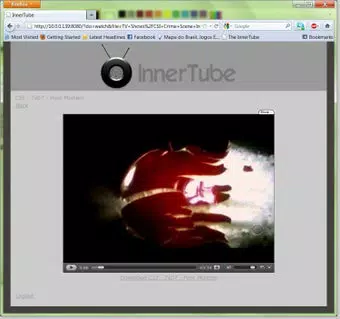
InnerTube features a clean, minimalist interface focused on usability rather than visual flair. The layout is structured around a central media grid with folders and file names clearly displayed, supported by a simple search bar and playback controls. Navigation is linear and predictable, minimizing user confusion, especially for non-technical individuals.
Although the developer did not list formal performance metrics, the application operates efficiently on standard home networks and older hardware. It does not consume significant system resources, which contributes to smooth playback and low latency during streaming. Responsiveness is consistent across different device categories, including desktops and laptops, though specific device compatibility was not disclosed.
Stability appears to be a strong point, given the app’s longevity since 2011. However, no official updates or maintenance details were provided. Users should expect basic functionality without advanced features like subtitles, transcoding, or multi-user accounts. The lack of mobile app support means that streaming must be initiated from a computer, limiting remote access.
Platform Compatibility & Technical Requirements
InnerTube is designed to operate on standard computer systems connected to a local network. The platform is not specified in detail, but based on its browser-based nature, it is compatible with Windows, macOS, and Linux systems that support web applications.
The application does not require a specific operating system version, though the developer did not specify minimum OS requirements. The file size is not provided, but given its lightweight design and portability, it is likely to be under 50 MB. No installation is required when running from a USB drive, making it highly adaptable to various hardware setups.
Compatibility with mobile devices is not confirmed. The app is intended for use via web browser on desktop or laptop computers, and no dedicated mobile app or responsive mobile interface has been documented.
Pros and Cons
- Completely free to use with no hidden costs
- Runs directly from USB or external drive—highly portable
- Simple, intuitive interface suitable for all age groups
- Enables simultaneous streaming across multiple devices on a home network
- Tracks watch history for uninterrupted viewing sessions
- Does not support mobile devices or mobile app access
- No official updates or recent development activity documented
- Limited to local network streaming—no remote access capability
- Basic interface without advanced features like subtitles or metadata
- Requires a computer to be powered on and connected to the network
FAQ
Is InnerTube safe to download and use?
Yes, InnerTube is a free, open-source tool designed for local network use. It does not collect personal data or require internet access, making it secure for private media management.
Can I use InnerTube on my smartphone?
InnerTube is not available as a mobile app. It can only be accessed through a web browser on a computer connected to the same home network.
Does InnerTube support subtitles?
Specific functionality regarding subtitles was not included in the provided information. The app may support them if they are embedded or placed in the same folder as the video file.
How do I update InnerTube?
There is no official update mechanism documented. Users should rely on the latest version available from the developer’s source if released.
Can I stream videos from InnerTube outside my home network?
InnerTube is designed for local network streaming only. Remote access is not supported unless configured manually through advanced network settings, which are not detailed in the provided data.
Final Thoughts
InnerTube remains a practical, no-frills solution for managing and streaming personal video libraries within a home network. Its portability, ease of use, and zero cost make it a compelling choice for users who value privacy, simplicity, and control over their media. While it lacks modern features like mobile access and remote streaming, it excels in its core purpose: delivering a reliable, browser-based media server that works across devices without installation.
It is best suited for families, digital archivists, and tech-savvy individuals who want a lightweight alternative to complex media center software. For those seeking a secure, offline way to share videos without subscriptions or cloud storage, InnerTube delivers real value.
Download InnerTube now


